 acqagent.ai
33,136 bid protests, mapped.
Every decision coded against 33 protest grounds and eight case facets, in a 3D constellation you can filter, a decision table, and per-ground sustain rates. As of v2.1 it opens straight in your browser, with a Setup tab for connecting your own model and the full license in the page; the downloadable bundles add full-text search over a smaller corpus.
Run it in your browser
The whole dashboard is one self-contained page. No download, no Python, no server, no account. It is the largest corpus the project has covered.
What is in it. 33,136 GAO bid protest decisions across 33 protest grounds and eight facets — ground, outcome, procurement authority, protest posture, decade, PDF source, text source and digest. Seven tabs: the 3D map, the decision table, Dynamic Search, Ground detail with per-ground sustain rates, Analysis, Setup, and the full license and credits.
The two model-backed tabs. Dynamic Search runs against a vector index of the full decision text. That index is far too large to ship inside a web page and needs a small server behind it, so the tab is present but says plainly that it is not part of this hosted copy; it works in the downloadable bundles below. Analysis does run here: point it at any OpenAI-compatible endpoint that allows browser requests, and hand it the decision text or PDF. Your key stays in your own browser and never reaches this site. The bundles remove both chores by reading the local corpus and holding the key server-side.
What it cannot tell you yet. The coding is AI-derived and has not been reviewed decision by decision. 82% of ground assignments are model-assigned rather than checked, and are marked with a dagger in the table and popups. Half the corpus has no recorded outcome, so sustain rates cover a subset rather than the whole. 27,239 decisions link to a gao.gov landing page rather than straight to the PDF. The dashboard states all of this on its own face as you use it, and links to a fuller explanation.
Where it is going. Accuracy and every feature here are under active work, release over release: more reviewed ground assignments, more recorded outcomes, more direct PDF links, and faster filtering over a corpus this size. Treat any single coded value as a lead to verify against the original decision, never as a finding.
Two new tabs
Analysis has always been able to run in the browser, but it needed a model endpoint and nothing on the page told you how to give it one. And the licensing sat on this site rather than in the file you were actually using. Both are now tabs in the dashboard itself.
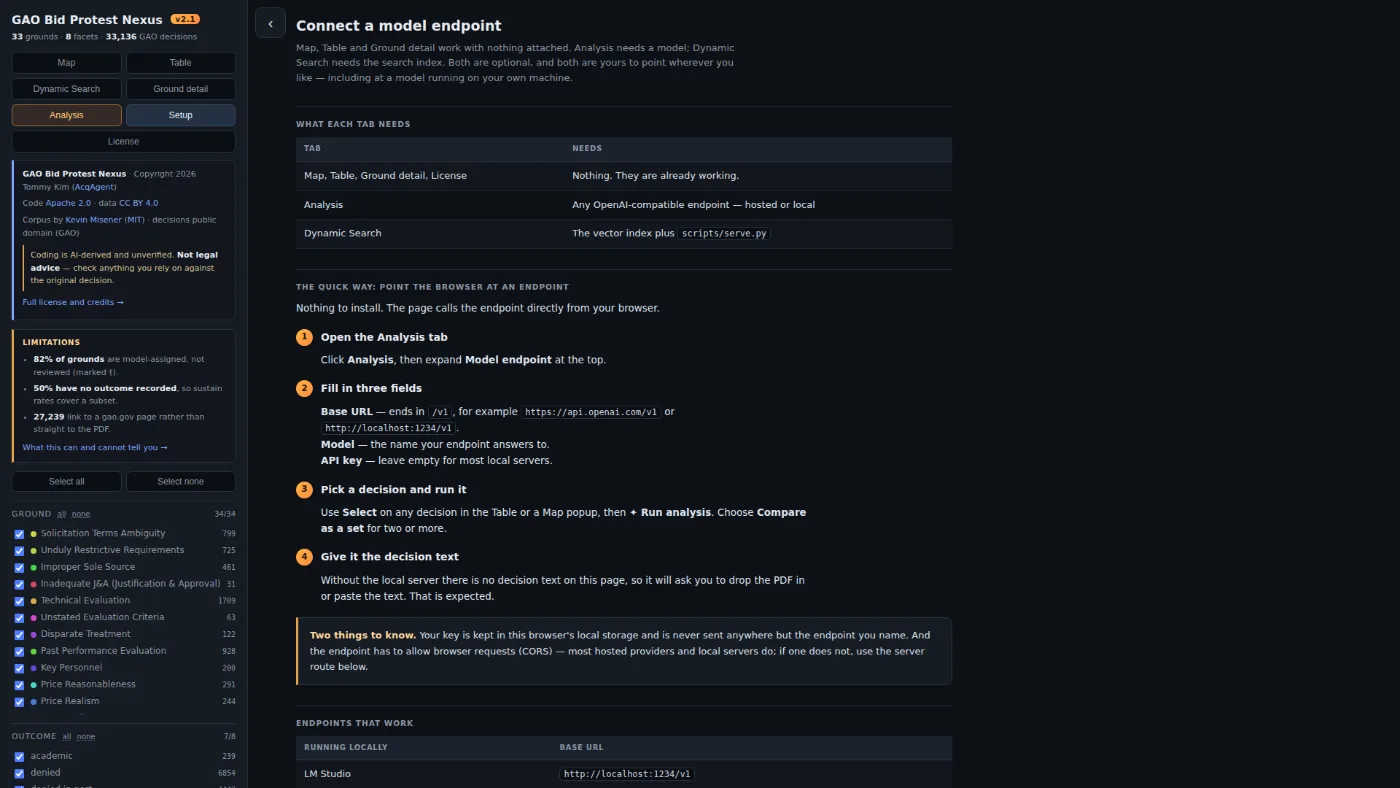
Setup answers the question the Analysis tab used to raise and leave hanging. Map, Table and Ground detail need nothing; Analysis needs any endpoint speaking the OpenAI /v1/chat/completions shape, hosted or running on your own machine; Dynamic Search needs the vector index and a server. The tab says which is which, gives the base URL for LM Studio, Ollama, llama.cpp and vLLM, and is straight about the two catches — your key is held in your own browser's local storage and goes nowhere but the endpoint you name, and an endpoint that refuses browser requests has to be reached through the project's own server instead.
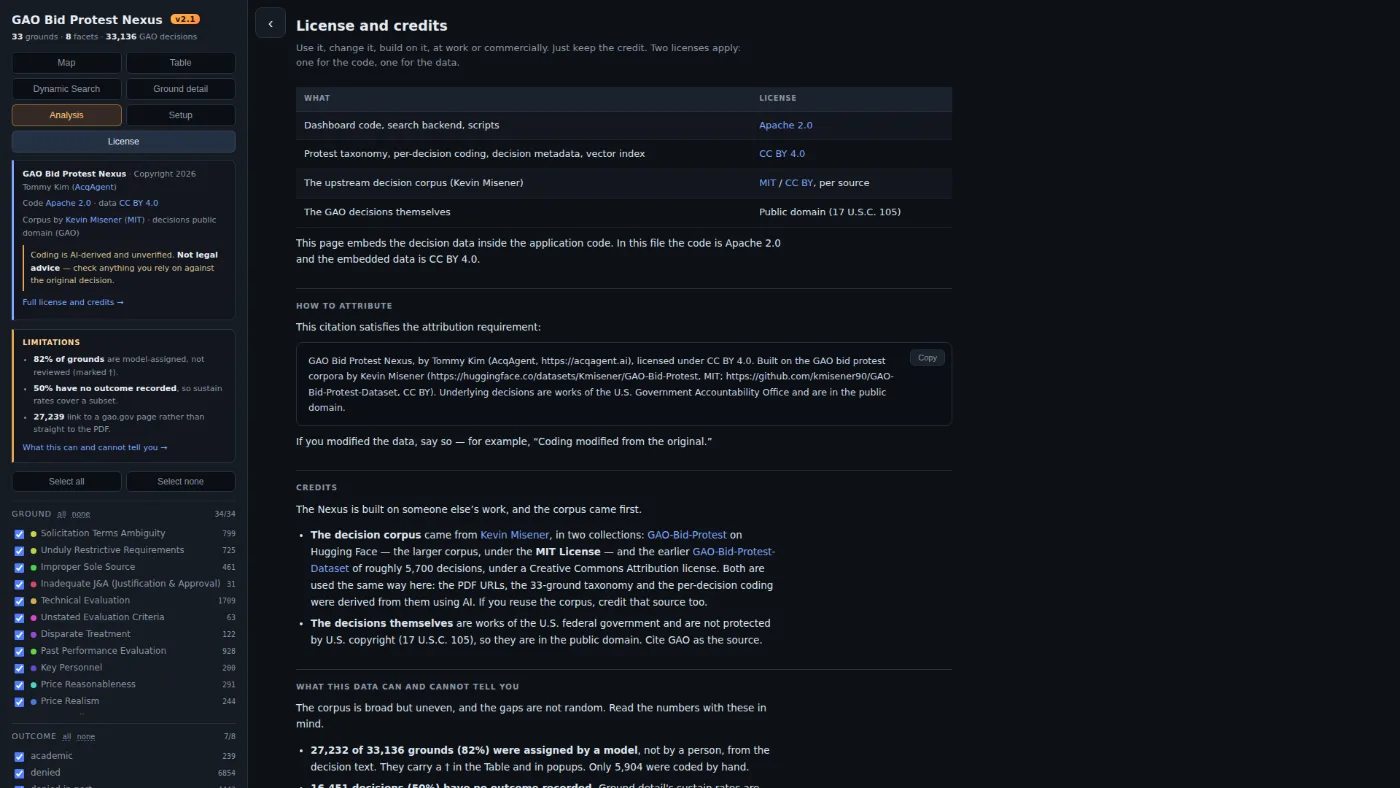
License puts the terms in the file. The dashboard is one self-contained page that people download and pass around, and a copy that has left this site should still be able to say what it is: Apache 2.0 for the code, CC BY 4.0 for the taxonomy and the coding, MIT and CC BY for the two upstream corpora, public domain for the decisions themselves. The citation that satisfies the attribution requirement is there to copy, and so is the same limitations accounting the map carries.
Download a bundle
The basic bundle is the v2.1 dashboard as a file: the same 33,136 decisions and eight facets you get in the browser, running offline with no server and no account. The full bundle adds the one thing neither can do on its own, full-text search over the complete decision text, and it is being rebuilt against v2.1, so its download is off until the new one lands. Note that its vector index still covers the earlier 5,986-decision corpus; Map, Table and Ground detail read the embedded data and are current either way. In the meantime the repository carries every file it contains except the vector index, which you can build yourself. Screenshots and step-by-step setup are below; the README covers hardware requirements and model options in full.
Download — Basic (.zip)
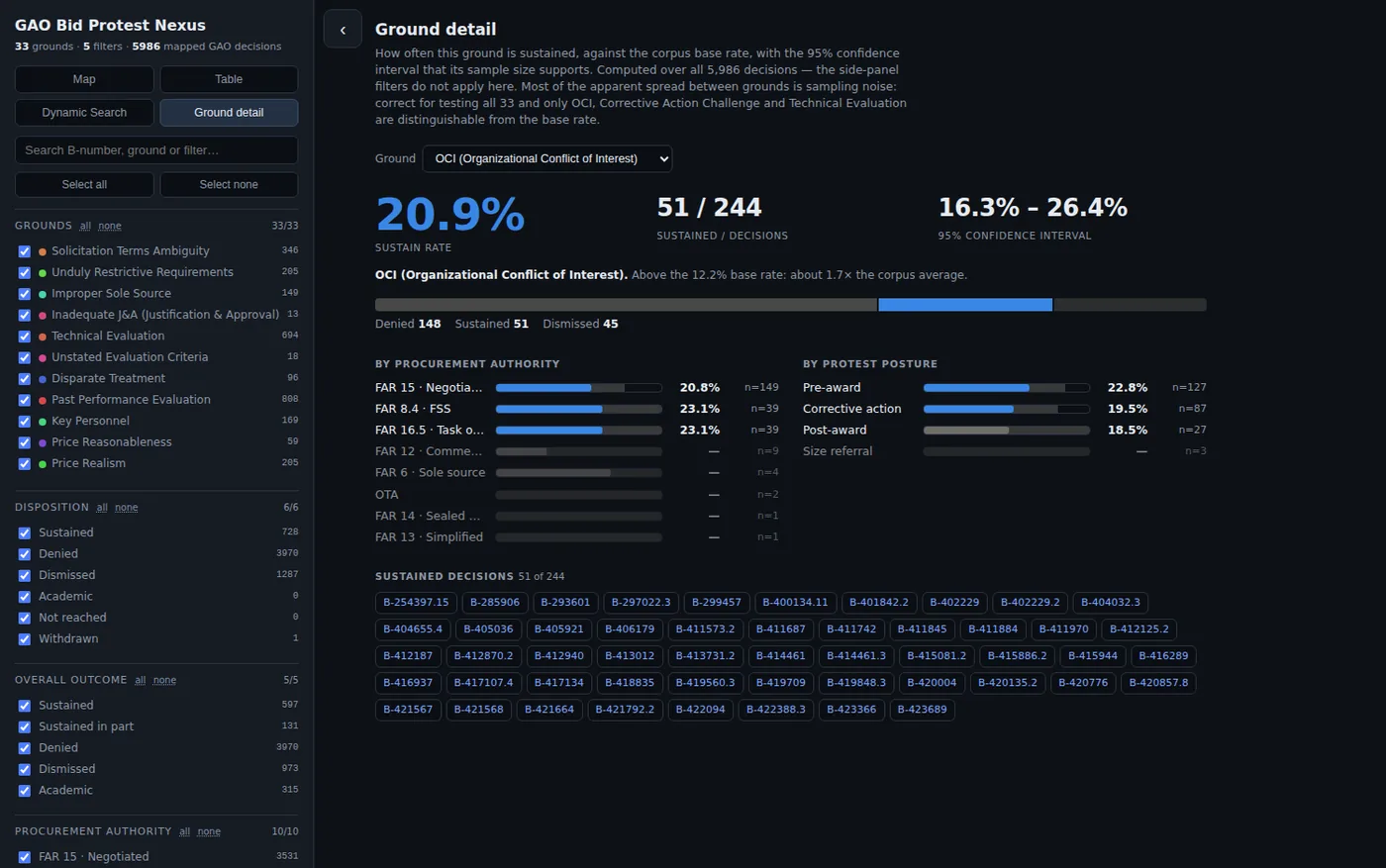
The whole v2.1 dashboard as one self-contained HTML file, plus the four license files. Unzip, open it in any browser, and you get all 33,136 decisions across eight facets: the 3D map, the full decision table, Ground detail — sustain rates by ground against the corpus base rate, each with the confidence interval its sample size supports — plus the Setup and License tabs. No Python, no server, no models, no network. The Analysis tab works here too, once you point it at a model endpoint and hand it the decision; Dynamic Search is the one tab that asks for a server.
Download .zip · 1.9 MB →Download — Full (.zip)
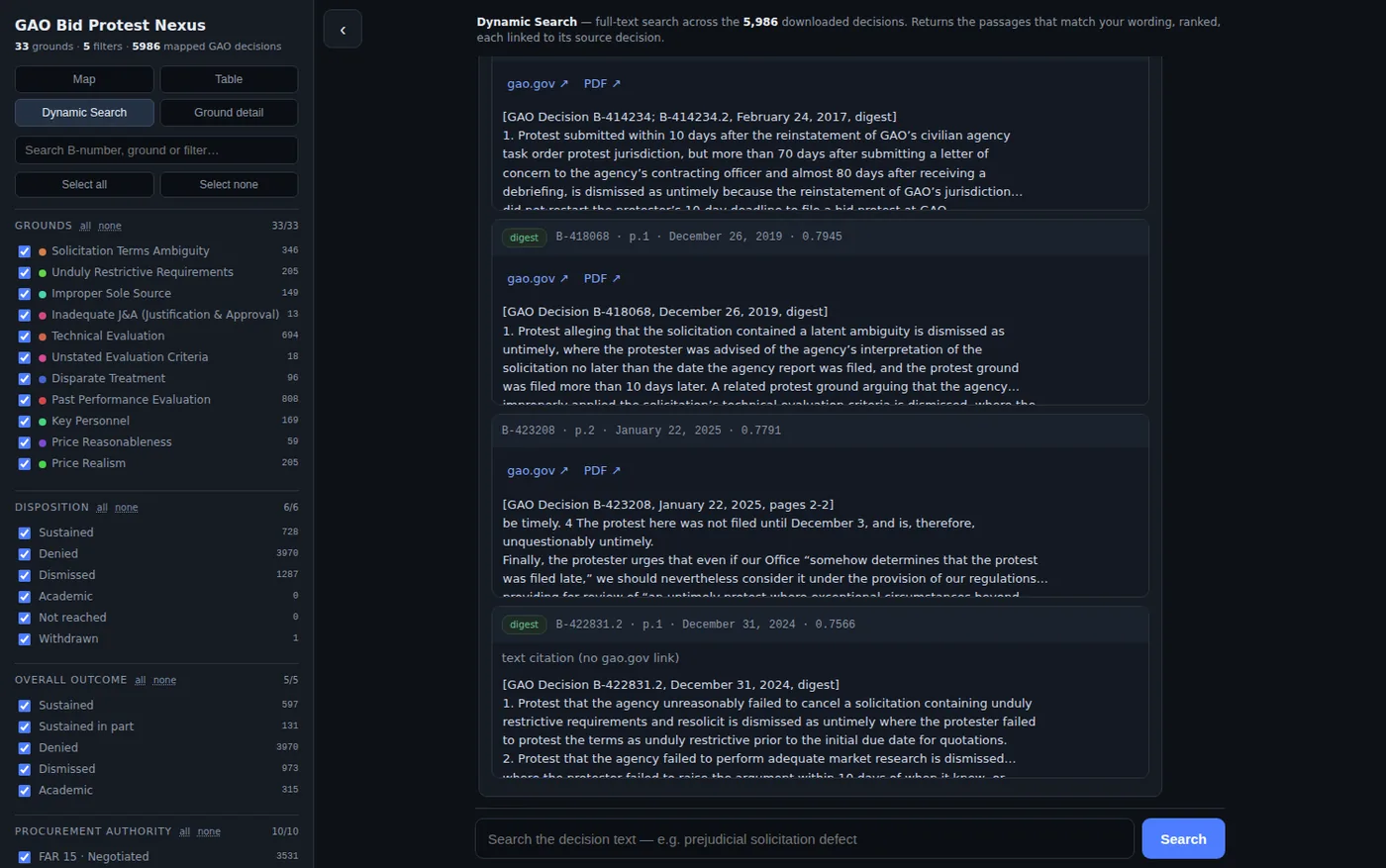
Everything in the basic bundle plus the Dynamic Search backend: the server scripts, the decision metadata, and a 77,979-chunk vector index. Hybrid retrieval — dense vectors, BM25, reciprocal rank fusion, and cross-encoder re-ranking — surfaces the passages that match a plain-language query, each linked back to its source PDF. The server also feeds the Analysis tab straight from that index, so it summarizes a decision without fetching anything. Runs on local models.
Being rebuilt against v2.1, so the download is off until the new one lands. Everything but the vector index is in the repository today, and the steps below cover building the index yourself.
Coming soonSource on GitHub
The dashboard, the search backend, and the decision metadata — browsable and forkable. The vector index ships only in the full bundle above; every other file is in the repository. Code is Apache 2.0; the data is CC BY 4.0.
View repository →What it looks like
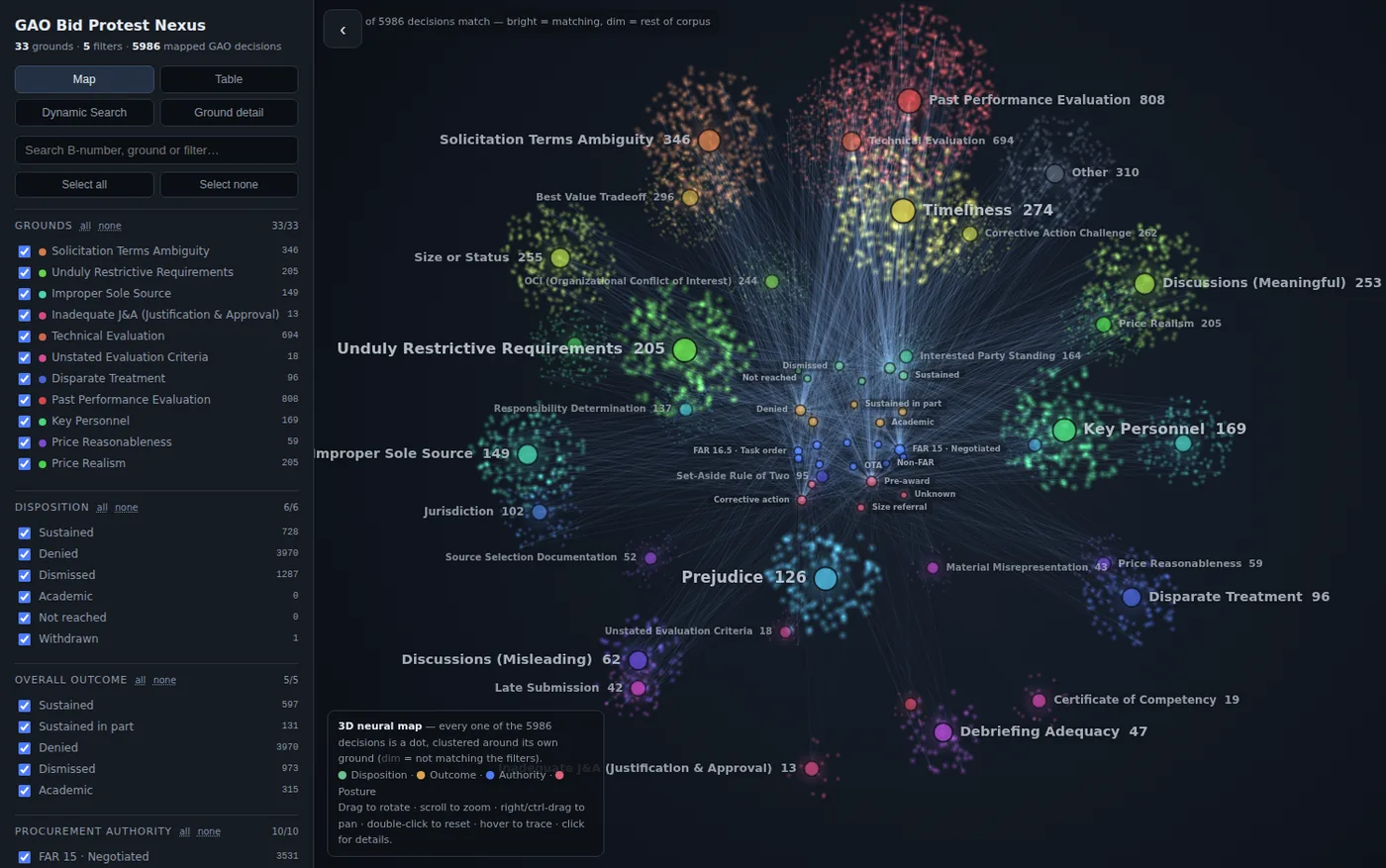
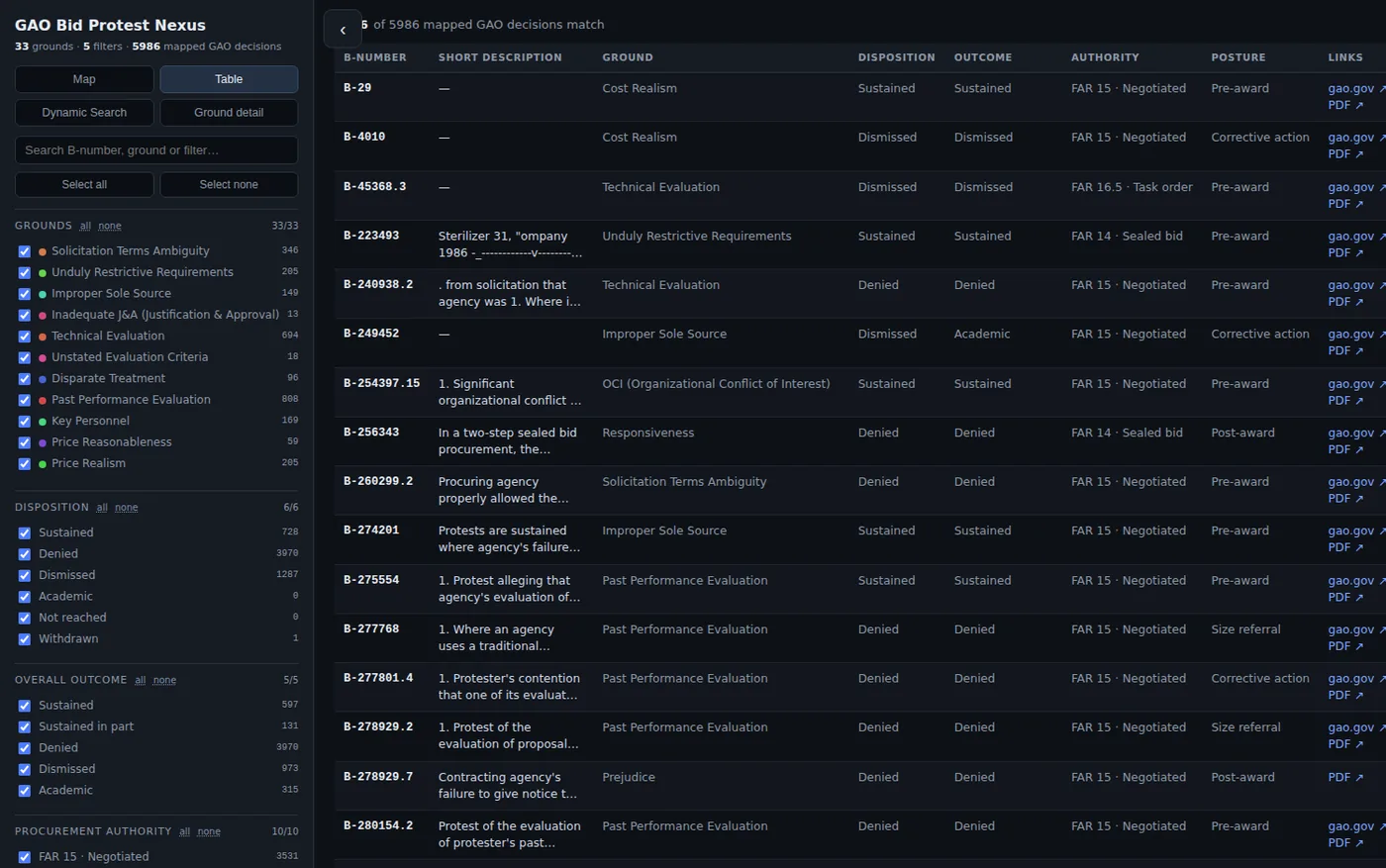
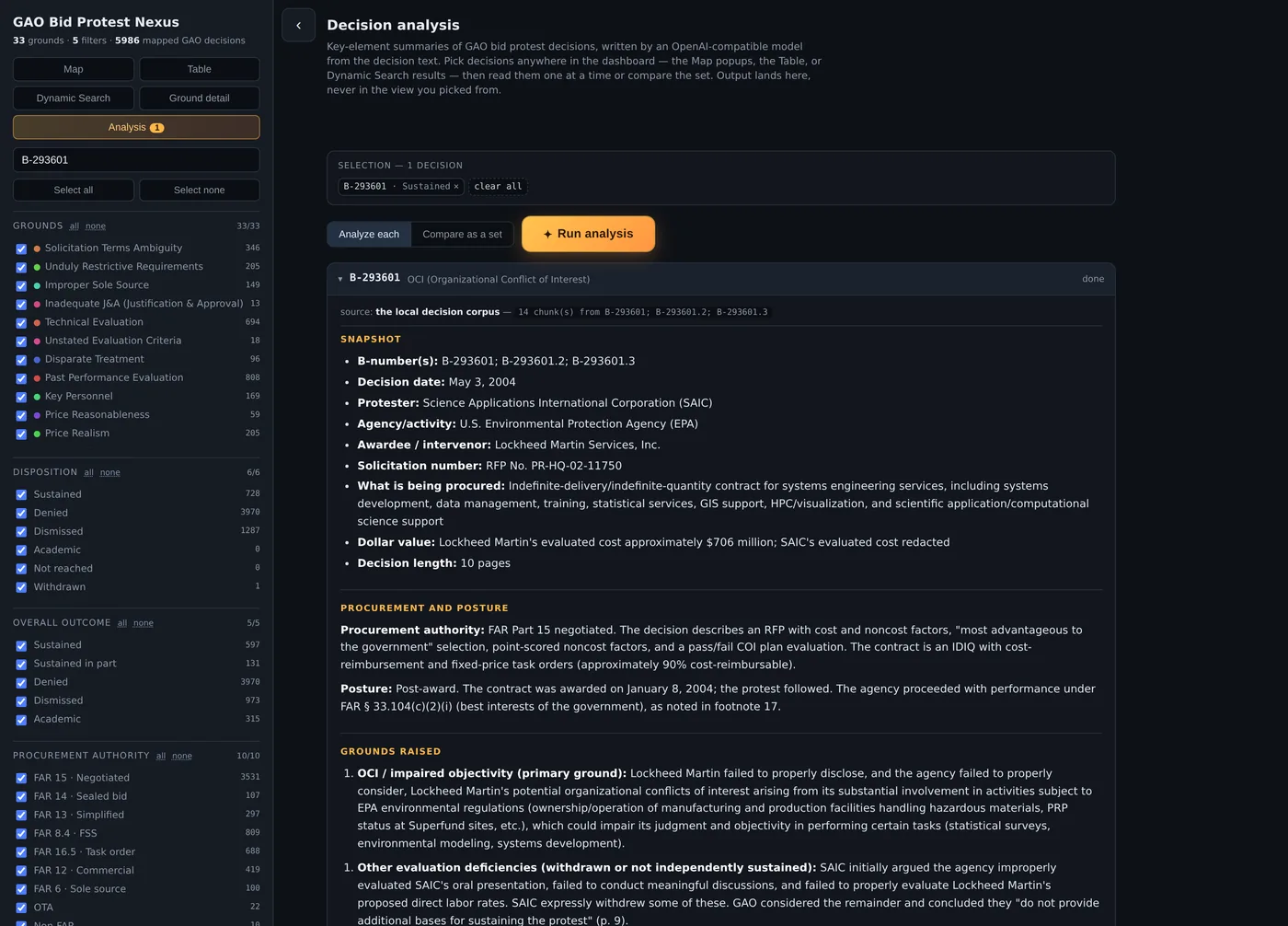
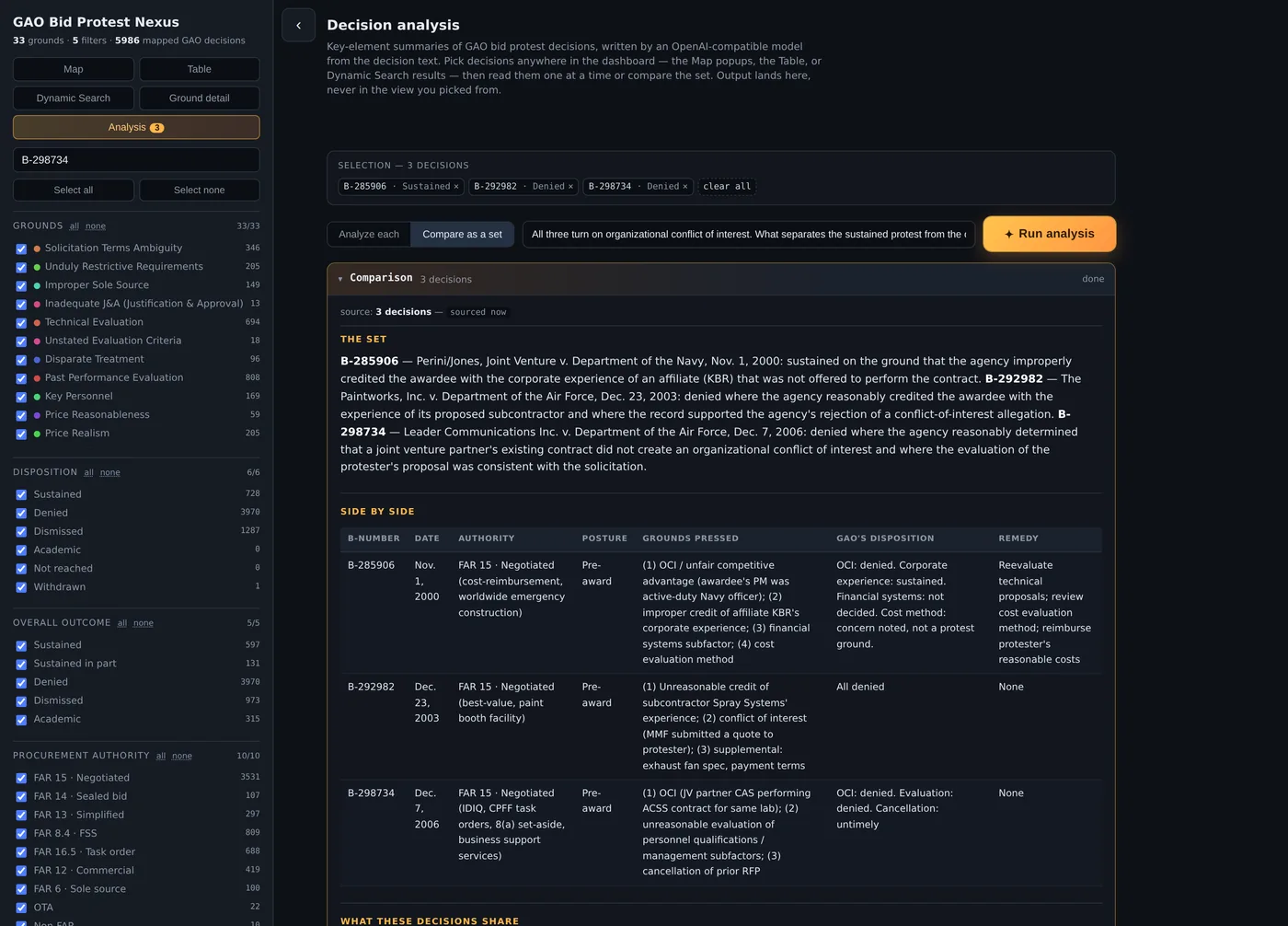
Map, Table, Ground detail, Setup and License run from the basic bundle with nothing installed. Dynamic Search needs the full bundle and a local Python server; Analysis needs a model endpoint, which can be one running on your own machine. These shots predate v2.1: they were taken against the earlier 5,986-decision corpus, so the counts are smaller than what you will see, and they show the layout from before Setup and License were added. The live dashboard is the current interface.
Run the full dashboard
The basic bundle needs nothing but a browser — Map, Table, Ground detail and License all work offline. These steps add the Dynamic Search tab: plain-language search across the full text of the decisions, running entirely on your own machine. They are written for the full bundle, which ships the vector index already built; while its v2.1 rebuild is still coming, step 1 clones the repository instead and step 2 builds the index. The last step is optional and wires up the Analysis tab.
Clone the repository. It carries everything the full bundle will — visualization/, scripts/, data/ and the license files — except the vector index, which step 2 builds.
git clone https://github.com/acqagent/GAO-Bid-Protest-Nexus.git
cd GAO-Bid-Protest-Nexus
No git? Use the green Code button on GitHub, choose Download ZIP, and unzip it into a folder of its own. When the full bundle is posted it will expand to the same layout with vector/ already filled in, and you can skip step 2 entirely.
Dynamic Search runs over a vector index of the decision text. The bundle will ship one; from a clone you build it once, against any embedding endpoint you can reach. Use a model trained for retrieval — Qwen3-Embedding, BAAI/bge-* or intfloat/e5-*. A general chat model produces vectors, but not ones that put a question near the passage answering it.
python3 scripts/vectorize.py --links pdf-links.csv \
        --embedder api --embed-base-url http://localhost:8080/v1 \
        --embed-model your-embedding-model
It writes vector/chunks.jsonl and vector/embeddings.npy. This is the long step; everything after it is quick.
Double-click visualization/map.html. Map, Table, Ground detail and License work immediately, with every filter, and no Python, server or network. Dynamic Search needs the steps below; Analysis needs step 8, or your own endpoint entered in the Setup tab.
The rest of these steps add Dynamic Search. You'll need Python 3.10 or newer, roughly 1.8 GB of free disk (0.4 GB index plus a one-time 1.4 GB model download), and 4 GB of RAM — 8 GB is comfortable. A GPU is optional and only makes re-ranking faster. Confirm your version with python3 --version.
From the folder you unzipped into:
python3 -m venv .venv
.venv/bin/pip install -r requirements.txt
Windows PowerShell:
python -m venv .venv
.venv\Scripts\pip install -r requirements.txt
Three dependencies: numpy, rank-bm25, and sentence-transformers.
.venv/bin/python scripts/serve.pyWindows: .venv\Scripts\python scripts\serve.py
The first run downloads about 1.4 GB of models from huggingface.co — BAAI/bge-base-en-v1.5 for dense embeddings and BAAI/bge-reranker-base for cross-encoder re-ranking. They land in ~/.cache/huggingface, so it happens once and every run afterwards is fully offline. Expect 30–60 seconds of startup while the vector store loads, ending in a [serve] ready line.
Visit http://127.0.0.1:8765/ and switch to the Dynamic Search tab. Ctrl+C in the terminal stops the server; the Map and Table tabs keep working without it.
Analysis writes the summaries and comparisons; it needs a model, which the bundle does not ship. Point it at anything speaking the OpenAI /v1/chat/completions shape — OpenAI, OpenRouter, Groq, or a local LM Studio, Ollama or vLLM. Set it in the server's environment before starting, and the key never reaches your browser:
export OPENAI_BASE_URL=http://localhost:1234/v1
export OPENAI_MODEL=your-model
export OPENAI_API_KEY=sk-...            # omit for most local servers
.venv/bin/python scripts/serve.py
If your model is a reasoning model — o-series, DeepSeek-R1, Qwen3 — add export OPENAI_REASONING_EFFORT=low. Those models bill their thinking against the same token budget as the answer, and on a long decision they can spend all of it reasoning and return an empty analysis with no error. Raising the budget does not help; capping the effort does. A local model also streams for minutes, so export OPENAI_TIMEOUT=1800 is worth setting.
Everything the tab does is also available headless — python3 scripts/analyze.py B-417327 writes the same Markdown with no browser at all.
The server binds to loopback only, so nothing is exposed to your network. Configuration, the search API, hardware notes, and cloud model options are all covered in the README.
Credits
The Nexus is built on someone else's work, and the corpus it reads came first.
The decision corpus came from Kevin Misener, in two collections. The 33,136 decisions behind the dashboard come from his GAO-Bid-Protest dataset on Hugging Face, released under the MIT license. The roughly 5,700 decisions behind the downloadable bundles come from his GAO-Bid-Protest-Dataset on GitHub, which is released under a Creative Commons Attribution license. Both were used the same way: the URLs to the decision PDFs, the 33-ground taxonomy and the per-decision coding were derived from his data using AI, and the dashboard and the search index are built on top of that. If you reuse either corpus, credit that source too.
The decisions themselves are works of the U.S. federal government and are not protected by U.S. copyright (17 U.S.C. § 105), so they are in the public domain. Cite GAO as the source.
Everything added here carries two licenses. The dashboard code, the search backend and the scripts are Apache 2.0. The 33-ground taxonomy, the per-decision coding, the decision metadata and the vector index are CC BY 4.0. Use it, change it, build on it, at work or commercially — just keep the credit. Releases before v1.0 were published under CC BY 4.0 in full and stay available under that license.